
Your BEVIDA uses the Guest profile for anyone it doesn't recognise, like a visitor. The Guest profile doesn't need a face scan.
It has its own pouring preferences, pour limits and insights, so you decide how your BEVIDA behaves for people it doesn't recognise.
When your BEVIDA uses the Guest profile
- Someone steps up to your BEVIDA and it doesn't know their face.
- Someone skipped face recognition when they were added.
- Face recognition is turned off, so everyone is treated as a guest.
- Someone covers the camera.
Set up the Guest profile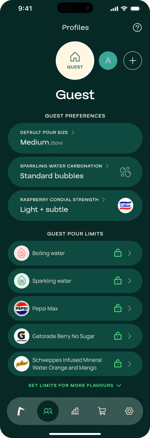
- In the BEVIDA app, tap the Profiles icon in the menu at the bottom.
- Tap the Guest picture at the top.
The Guest profile page looks like any other profile, with a few differences:
- Preferences: default pour size, sparkling water carbonation and cordial strength. There's no water goal. See Set profile preferences.
- Pour limits: set them for each flavour and type of water, the same way as any other profile. The Guest profile is shared, so a limit covers everyone using it together, not each person separately. See Set pour limits.
- Insights: you can see how much has been poured on the Guest profile, without a water goal. See Tracking what you pour.
Pouring as a guest
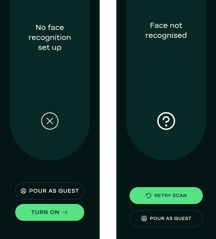
If face recognition is turned on, when someone using the tap is not recognised they will see a 'Face not recognised' screen with a 'Pour as guest' button. IF not turned on, the screen will say 'No face recognition set up' instead.
Your BEVIDA will use the default pour size, sparkling water carbonation and cordial strength you set in the Guest profile in app, and will have limits on any beverages if set.
Before pouring, guests can change the size of their pour on your BEVIDA's screen. For a free pour, press and hold the pour button.
Which BEVIDA settings can the Guest profile access?
Anyone using the Guest profile can use every setting on your BEVIDA's own screen, the same as an admin profile. That includes turning face recognition off or on and factory reset, so a BEVIDA that's been left behind can still be reset. Other profiles that aren't admins can use everything except those two. See Factory reset your BEVIDA.