
The BEVIDA app should keep you logged in most of the time. It could log you out of your app gets updated or your app gets re-downloaded.
You won't use a password to log in. Each time after you enter your email address, we'll email a six-digit code for you to enter in order to verify it's you and log in. This keeps your account safe without a password to remember.
Before you start
- You have a BEVIDA account. If you don't, see Download the app and create your account.
- You can open the email account you signed up with. The code goes to that address only.
- You have an internet connection on your phone.
Sign in
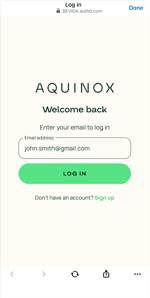
- Open the BEVIDA app.
- Tap Log back in.
- On Welcome back, enter the email address you signed up with, then tap Log in.
- Open the email from BEVIDA on your phone or computer and find the six-digit code.
- Back in the app, enter the code in 6 digit code, then tap Continue.
You're signed in. The code expires after 10 minutes, so enter it soon after it arrives.
Get a new code
If the email doesn't arrive, wait a minute and check your junk or spam folder. Then tap Resend beside Didn't receive an email? to get a new one. Use the newest code.
If the email address on the screen isn't right, tap Edit beside it and enter the correct one.
Sign out
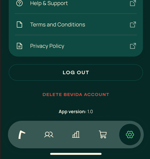
- In the BEVIDA app, tap the cog at the bottom right to open Settings.
- Tap Log out.
You'll need a new code to sign in again.
If it doesn't work
If the code never arrives or the app says it isn't right, contact us and we'll help you get back in. If you've changed your email address, see Update your account details.