
Your orders, including your BEVIDA and any refills, show their progress on your account page in the BEVIDA app. We also email you about your order and its delivery, so you can follow along even when you're not in the app.
Before you start
- You're signed in, in the BEVIDA app or on the website.
- You have an internet connection.
- You can open the email account you signed up with. You log in with a code we email you, not a password.
- Refills are only shipped within Australia.
Find your orders in the BEVIDA app
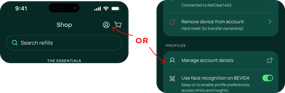
- In the BEVIDA app, tap the cog at the bottom right to open Settings, then tap Manage account details. Or tap the Shop icon in the menu at the bottom, then the account icon at the top right.
- You may be asked to log in again in this window. If so, enter your email address, then the six-digit code we email you.
- Tap Orders.
Each order is a card. At the top is its status, for example On its way, with the estimated delivery date. Below are the items, the order number, how many items it has and the total.
When you're finished, close the window to go back to the BEVIDA app.
Check your orders on the website
You can also see your orders on the website where you bought your BEVIDA and your refills.
- Go to the BEVIDA website and tap the profile icon in the top right to open your account.
- Enter your email address, then the six-digit code we email you.
- Open the Orders page.
See the details of one order
- On the Orders page, tap the order.
- Check the expected delivery date. The carrier and a tracking number link are shown underneath. Tap the link to see the delivery on the carrier's own site.
- Scroll down for the timeline, which shows each step of the order with its date, for example Submitted, Confirmed and On its way.
Further down are your contact details, shipping address and method, payment and billing address for that order.
Order again
On an order card, tap Buy again to put the same items in your cart. Manage shows what else you can do with that order.
If it doesn't work
If an order is missing, hasn't moved for several days or arrived damaged, contact us with your order number.