
Away mode is for when you're away from home for a long time, like a holiday. It shuts your BEVIDA down completely to save power until you turn it off.
While it's on, your BEVIDA's screen looks off and doesn't let anyone pour. If you tap the screen or press the pour button, it shows a message that away mode is on.
It takes longer to get back to temperature than after power saving mode, so your water won't be at the right temperature straight away. You can still pour, but chilled and hot water won't be at the temperature you chose yet.
For everyday energy saving, like overnight, use power saving mode instead.
Before you start
- You're signed in to the BEVIDA app as the account owner.
Turn on away mode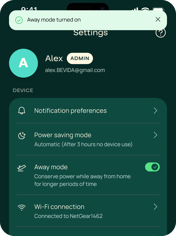
- In the BEVIDA app, tap the Settings icon in the menu at the bottom.
- Under Device, tap the switch for Away mode.
- The app asks Are you sure you want to turn on Away mode? Tap Turn on. Tap Cancel if you've changed your mind.
A message confirms Away mode turned on. On the home screen, your BEVIDA shows Away mode and a banner that says it's conserving power while you're away.
Turn off away mode
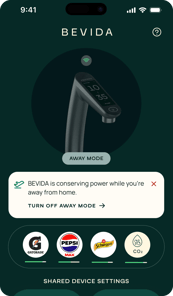
To pour again, turn away mode off in the app.
- In the BEVIDA app, tap Turn off away mode in the banner on the home screen. You can also tap the switch for Away mode in Settings.
- A message confirms Away mode turned off. Device will take time to reach temperature.
- Your BEVIDA warms up and cools down. Its screen shows how many minutes until it's ready. When that's done, it's at temperature.
It doesn't ask you to confirm when you turn it off.
If your BEVIDA loses wifi while away mode is on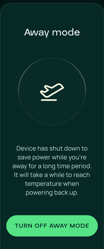
The app can't reach your BEVIDA without wifi. If your BEVIDA's wifi drops, or you tap its screen or press its pour button, the screen shows an Away mode and a Turn off away mode button.
When Away Mode turns off
Your BEVIDA might show Reaching temperature for a little while. See Why isn't my BEVIDA cold or hot yet?.