
Pour limits let you decide how much a profile can pour of each flavour and water type on the BEVIDA.
For each flavour or type of water, you can leave it unlimited, set a daily limit, or lock it. Limits are set per person, so you can limit boiling water for one person and a cordial for another.
Before you start
- The person has a profile and has set up face recognition — or you're seeing a limit for the Guest profile. Your BEVIDA applies limits to profiles it recognises using face recognition, and to the Guest profile. See How the guest profile works.
- You set limits for everyone from your own app.
- Everything starts as unlimited.
Set pour limits
- In the BEVIDA app, tap the Profiles icon in the menu at the bottom, then tap the profile
you want to set limits for in the top profile sector.
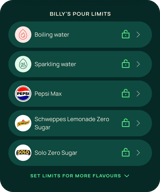
- Scroll to Pour limits. It has Boiling water and Sparkling water, as well as the three flavours currently on your BEVIDA showing.
- Tap the one you want to limit.
- Choose one of three options:
- Unlimited pours: no limit.
- Locked: the person can't pour it.
- Limit per day: the person can pour up to the amount you set each day. (Midnight to 11:59pm)
- Tap Save.
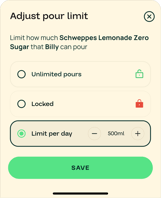
If you chose Limit per day, tap − or + to change the amount. It moves 125ml at a time, which is half a glass. It starts at 500ml. If the amount you choose is too high or too low, the app tells you it's the highest or lowest a daily limit can be. The lowest is 125ml and the highest is 4,000ml.
Remove a limit
Open it again, choose Unlimited pours and tap Save.
Set limits for other flavours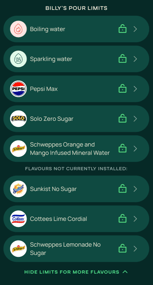
The list only shows what's on your BEVIDA now.
To set a limit on a flavour you don't have installed yet, tap Set limits for more flavours at the bottom of the list. You will see all other flavours that are available to buy as refills. If you set limits or lock these, they will apply when that flavour is installed in your BEVIDA.
When someone reaches their limit
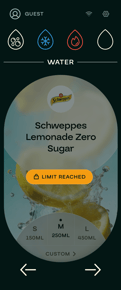
A daily limit starts again at midnight. When the person has poured their limit, your BEVIDA shows a Limit reached tag with a padlock on it when they're recognised, and the pour button is greyed out.
The app also sends you a notification that they've reached their pour limit. To stop getting these, switch off Daily pour limit reached in notification preferences.
See how limits are used
Your insights show how much each profile has poured.